PDF dark mode in Firefox: how to read comfortably
Published: March 16, 2026
Lena switched to Firefox years ago for the privacy features and never looked back. Her entire setup is dark — Firefox theme, OS dark mode, dark terminal, dark code editor. Then she opens a PDF link in Firefox and gets the same blinding white page she was trying to avoid. Firefox's PDF viewer (built on the open-source PDF.js engine) doesn't have a built-in dark mode switch in the toolbar.
The good news: there's a simple fix that works directly in Firefox, requires no extensions, and keeps your PDF processing local — which matters if you chose Firefox partly for privacy reasons.
Quick answer
Open the PDF Dark Mode Reader in Firefox, upload your PDF, and read with a dark theme — no extensions, no sign-up. Your file stays in your browser and is never sent to a server. For a downloadable dark PDF, use Invert PDF Colors.
Method 1: read with a dark theme in Firefox
- Open a new tab in Firefox and go to the PDF Dark Mode Reader.
- Upload your PDF using the upload area, or drag and drop the file directly onto the page.
- Choose a dark theme. Warm and Classic work well for extended reading — see our theme comparison guide for details.
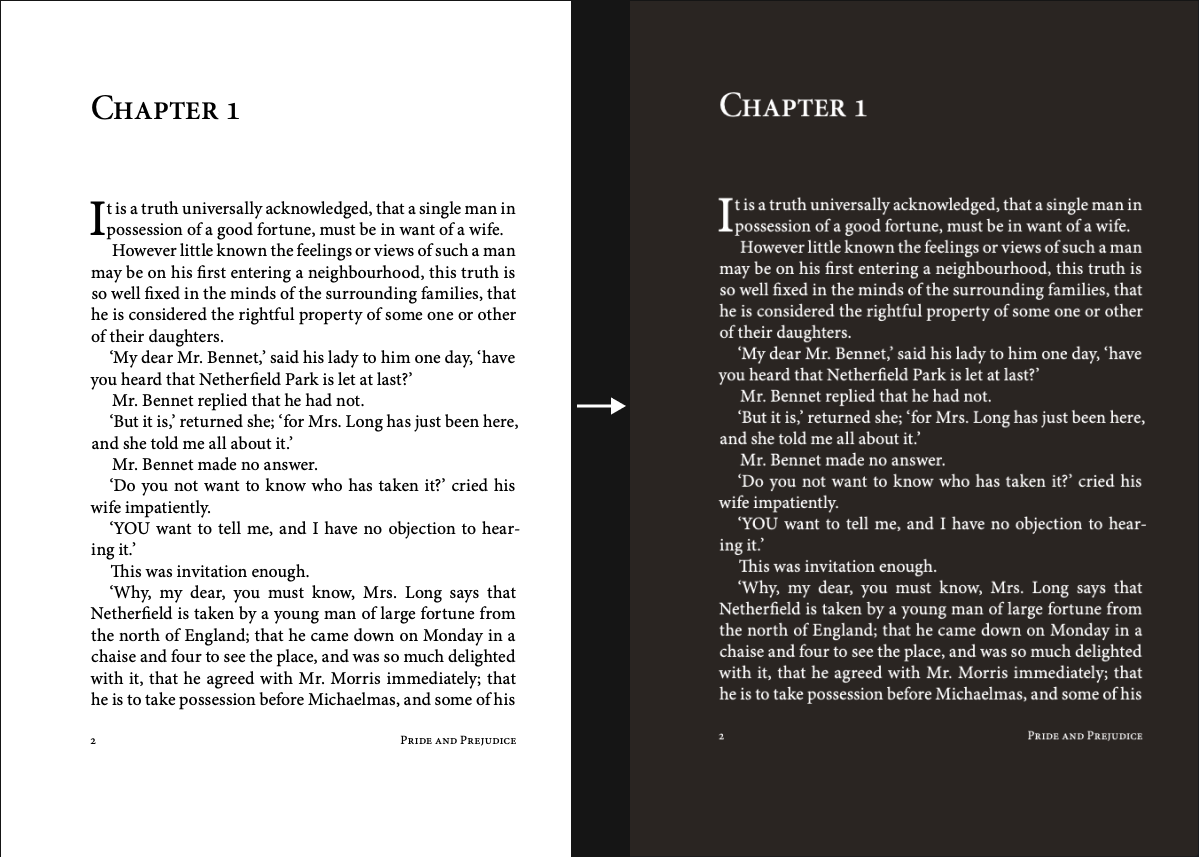
- Read directly in Firefox. The dark theme applies to the full document.
Processing happens entirely in your browser using local JavaScript — no data is sent to any server. For Firefox users who care about privacy, this means your document content never leaves your device.
Before/After effect
Method 2: download a dark PDF
If you want a dark PDF saved to your computer — to open offline, share, or use in another app — convert and download it.
- Open Invert PDF Colors in Firefox.
- Upload your PDF and choose a theme.
- Click Download. The converted file saves to your Firefox downloads folder.
The dark background is embedded into the downloaded file. You can open it in any PDF viewer — Firefox's built-in viewer, a desktop reader, or a mobile app — and the dark background stays.
About Firefox's PDF viewer (PDF.js)
Firefox renders PDFs using PDF.js, an open-source JavaScript-based PDF engine developed by Mozilla. Unlike Chrome and Edge, which use native browser PDF rendering, Firefox does all PDF rendering in JavaScript. This is part of why Firefox's PDF viewer behaves differently from other browsers in some edge cases.
Firefox's PDF toolbar includes standard controls: page navigation, zoom, rotation, print, and download. There is no dark mode toggle in the current toolbar. OS dark mode does not affect the PDF background — even with system dark mode enabled, Firefox's PDF viewer still displays a white background. Dark mode support for PDF.js is an open feature request that has not shipped as a built-in option yet.
For a consistent dark PDF experience in Firefox, using the browser-based reader or converting the file is the most predictable approach.
Firefox vs Chrome vs Edge: PDF dark mode compared
All three major desktop browsers face the same core limitation — PDFs don't respond to system dark mode the way web pages do. Here's how they compare:
| Feature | Firefox | Chrome | Edge |
|---|---|---|---|
| PDF engine | PDF.js (open source) | Native (PDFium) | Native (PDFium) |
| Dark mode toggle in toolbar | No | No | No |
| OS dark mode affects PDF | No | No | No |
| Built-in annotation tools | Ink, text notes (no highlight) | Limited | Full (draw, highlight, notes) |
| Privacy (local PDF processing) | Yes | Yes | Yes |
| Reliable dark mode solution | Browser-based reader | Browser-based reader | Browser-based reader |
FAQ
Does Firefox send my PDF anywhere when I use the dark mode reader?
No. The PDF Dark Mode Reader processes your file locally in Firefox using JavaScript — the same way Firefox's own PDF.js works. Your document never leaves your browser. This is true whether you're using the reader for viewing or Invert PDF Colors for downloading a converted file.
Does enabling Firefox's dark theme affect PDFs?
Firefox's browser theme (dark UI chrome) changes the browser interface — tabs, toolbar, sidebar — but not the content inside a PDF document. The PDF itself has its own colors that the browser theme can't override.
Can I use this on Firefox for Linux?
Yes. The PDF Dark Mode Reader works in Firefox on Linux, macOS, and Windows. No platform-specific setup needed — just open it in your browser.
Is there a Firefox extension for PDF dark mode?
Some dark mode extensions exist for Firefox, but most target web pages rather than PDFs — they affect HTML and CSS content, not the fixed-format rendering inside Firefox's PDF viewer. A browser-based PDF reader gives more consistent results without the complexity of managing extension permissions.